
iPlays Datasheet
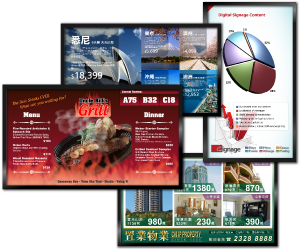
iPlays is the primary module of iSignage. It allows our clients to broadcast information to their audiences through its extensive features and user-friendly interface. iSignage supports a large variety of content formats; our clients can incorporate images, movies, flash files, RSS feeds, rolling messages and many more into their own unique dynamic display. With our centralized content management system, the system administrator can control and update the display contents of multiple screens in multiple locations in real-time without leaving the office. Our clients can also schedule their systems to play different content during different times or dates.
iPlays is ideal for retailers who wish to play product and sales information content on their iSignage systems. It also allows partnership with vendors, introducing a new stream of revenue opportunities as retailers may play advertisements. Schools and corporate offices may elect to use iPlays as well. Some of our clients choose it to display photographs of school or corporate events in corridors and lobbies as iPlays requires minimal maintenance and new photos from recent events can be added with just a few clicks.
iPlays is the primary module of iSignage. It allows our clients to broadcast information to their audiences through its extensive features and user-friendly interface. iSignage supports a large variety of content formats; our clients can incorporate images, movies, flash files, RSS feeds, rolling messages and many more into their own unique dynamic display. With our centralized content management system, the system administrator can control and update the display contents of multiple screens in multiple locations in real-time without leaving the office. Our clients can also schedule their systems to play different content during different times or dates.
iPlays is ideal for retailers who wish to play product and sales information content on their iSignage systems. It also allows partnership with vendors, introducing a new stream of revenue opportunities as retailers may play advertisements. Schools and corporate offices may elect to use iPlays as well. Some of our clients choose it to display photographs of school or corporate events in corridors and lobbies as iPlays requires minimal maintenance and new photos from recent events can be added with just a few clicks.

iMenu Datasheet
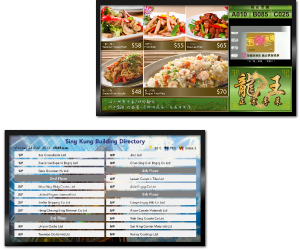
iMenu builds on the successful iPlays solution and offers our clients the ability to create and maintain their own menu and service item database. Similar to iPlays, iMenu allows clients to preset and schedule menu board displays for multiple locations by utilizing the centralized content management system; with the menu board in iMenu, items and their prices can be modified easily.
Office buildings may use iMenu to replace the traditional building directory. Using iMenu, tenant information is updated by just a few mouse clicks. Additionally, the building management can display useful live data such as temperature, date and time and even stock index information. By using the ticker feature, the building management can broadcast emergency notice to tenants and visitors within a short period of time.
Museums can deploy digital menu at the museum to display, interior layout of the museums, descriptions of exhibits or exhibitions and any other information they want to show to their visitors. Movie theaters and booking offices can display information about the seating available for each show time and other movie schedule information to their customers.
iMenu helps the fast food operator broadcast and promote food menus at the reception counter. It replaces the traditional food menu bar which is updated manually by staff at different session during the restaurant operating hours. With iMenu, updates are made in seconds and the information display is more attractive. Furthermore, the headquarters can manage the pricing information as well as the products information, making run operations more smoothly and effectively.
iMenu builds on the successful iPlays solution and offers our clients the ability to create and maintain their own menu and service item database. Similar to iPlays, iMenu allows clients to preset and schedule menu board displays for multiple locations by utilizing the centralized content management system; with the menu board in iMenu, items and their prices can be modified easily.
Office buildings may use iMenu to replace the traditional building directory. Using iMenu, tenant information is updated by just a few mouse clicks. Additionally, the building management can display useful live data such as temperature, date and time and even stock index information. By using the ticker feature, the building management can broadcast emergency notice to tenants and visitors within a short period of time.
Museums can deploy digital menu at the museum to display, interior layout of the museums, descriptions of exhibits or exhibitions and any other information they want to show to their visitors. Movie theaters and booking offices can display information about the seating available for each show time and other movie schedule information to their customers.
iMenu helps the fast food operator broadcast and promote food menus at the reception counter. It replaces the traditional food menu bar which is updated manually by staff at different session during the restaurant operating hours. With iMenu, updates are made in seconds and the information display is more attractive. Furthermore, the headquarters can manage the pricing information as well as the products information, making run operations more smoothly and effectively.

iEvents Datasheet
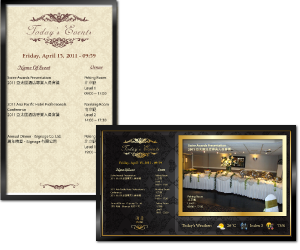
iEvents is specially designed for hotel operators to manage their events listings. Administrators centrally manage the hotel events listing from their desks; they control the display time of the events at different locations through admin console page, with the built in system setting function, and can change background color, shadow color, font color and size etc. at his discretion.
With iEvents, staff will no longer be required to spend time updating meeting schedules and focus time and effort on offering better service to the hotel guests. iEvents not only improve hotel staff productivity, the HD display function can also displaying attractive, compelling, and dynamic content. Hotel guest can see the events listing at the reception area and the events detailed information at the function rooms with their logo on it, they will be much impressed by the service provided by the hotel.
iEvents is specially designed for hotel operators to manage their events listings. Administrators centrally manage the hotel events listing from their desks; they control the display time of the events at different locations through admin console page, with the built in system setting function, and can change background color, shadow color, font color and size etc. at his discretion.
With iEvents, staff will no longer be required to spend time updating meeting schedules and focus time and effort on offering better service to the hotel guests. iEvents not only improve hotel staff productivity, the HD display function can also displaying attractive, compelling, and dynamic content. Hotel guest can see the events listing at the reception area and the events detailed information at the function rooms with their logo on it, they will be much impressed by the service provided by the hotel.

iQueue Datasheet
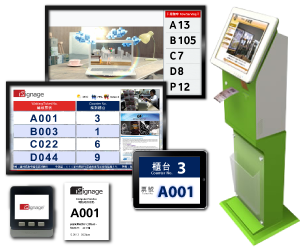
iQueue is the perfect solution to simultaneously manage customer flow and deliver information to customers in line. With iQueue, our clients integrate their ticketing systems into their digital signage systems to manage the customer flow at their reception areas. Screens can be divided to give areas in which our clients can display advertisements to their customers while they are waiting for service.
iQueue transforms our clients' customer lines into virtual queues so that customers can sit in waiting areas instead of stand in physical lines. In addition, with iQueue uniquely developed algorithm , we can work out the most accurate estimate queuing times based on the historic records and customers may choose to walk around and come back later if they are given an estimated time of service. iQueue can even record customers' phone numbers and send reminders through SMS when customers are next in line.
When staff members become available, they inform the system with a physical keypad, touch screen monitor or even iPad/iPhone.
iQueue is a sophisticated system which monitors the customer flow by recording all activities of every individual customer: when customers took a ticket, called to a service counter, or terminated the transaction, etc. All this information is stored in the iQueue system and these data can be retrieved and evaluated when needed. They can be presented at your desktop computer or as printed reports. Such reports are excellent tools of research and may aid in improving customer service and achieving better cost-effectiveness.
Patient Flow management System
Find out how our Patient Flow Management System helps our hospital and clinic clients to manage their patient flow and improve the efficiency of medical staffs and management team.

Find out how our Patient Flow Management System helps our hospital and clinic clients to manage their patient flow and improve the efficiency of medical staffs and management team.
iQueue is the perfect solution to simultaneously manage customer flow and deliver information to customers in line. With iQueue, our clients integrate their ticketing systems into their digital signage systems to manage the customer flow at their reception areas. Screens can be divided to give areas in which our clients can display advertisements to their customers while they are waiting for service.
iQueue transforms our clients' customer lines into virtual queues so that customers can sit in waiting areas instead of stand in physical lines. In addition, with iQueue uniquely developed algorithm , we can work out the most accurate estimate queuing times based on the historic records and customers may choose to walk around and come back later if they are given an estimated time of service. iQueue can even record customers' phone numbers and send reminders through SMS when customers are next in line.
When staff members become available, they inform the system with a physical keypad, touch screen monitor or even iPad/iPhone.
iQueue is a sophisticated system which monitors the customer flow by recording all activities of every individual customer: when customers took a ticket, called to a service counter, or terminated the transaction, etc. All this information is stored in the iQueue system and these data can be retrieved and evaluated when needed. They can be presented at your desktop computer or as printed reports. Such reports are excellent tools of research and may aid in improving customer service and achieving better cost-effectiveness.

iMeeting Datasheet
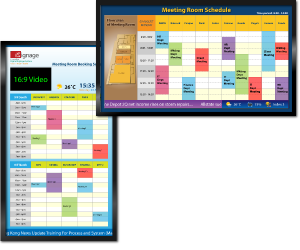
iMeeting is a real-time meeting room scheduling module that increases the productivity of your meeting room resources and prevents both double booking and forgotten cancellations. iMeeting integrates with an existing Outlook calendar for meeting room booking purposes, allowing our clients to use Outlook's global address list function to invite parties to meetings more easily. The meeting schedule can be broadcasted by an LCD display in real-time, instantly displaying reschedules and cancellations. With iMeeting our clients centrally manage meeting room bookings and keep everyone in the office informed of booking statuses. It can keep meeting room records for Management to review.
iMeeting may integrate with the company intranet and allow staff to check meeting room availability before sending meeting requests to invite parties to meetings. The iMeeting icon is added onto the company intranet page so that internal staff can send its meeting request from there. Clients can also add corporate videos, photos, ticker messages, RSS feed featuring updates of information such as weather and exchange rates to the display panel to keep everyone in the office well informed of related information.
iMeeting is a real-time meeting room scheduling module that increases the productivity of your meeting room resources and prevents both double booking and forgotten cancellations. iMeeting integrates with an existing Outlook calendar for meeting room booking purposes, allowing our clients to use Outlook's global address list function to invite parties to meetings more easily. The meeting schedule can be broadcasted by an LCD display in real-time, instantly displaying reschedules and cancellations. With iMeeting our clients centrally manage meeting room bookings and keep everyone in the office informed of booking statuses. It can keep meeting room records for Management to review.
iMeeting may integrate with the company intranet and allow staff to check meeting room availability before sending meeting requests to invite parties to meetings. The iMeeting icon is added onto the company intranet page so that internal staff can send its meeting request from there. Clients can also add corporate videos, photos, ticker messages, RSS feed featuring updates of information such as weather and exchange rates to the display panel to keep everyone in the office well informed of related information.

iXchange Datasheet
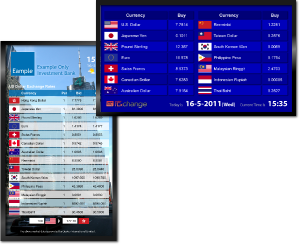
iXchange is designed to replace the traditional currency exchange board and offer a cutting-edge digital currency exchange solution to display currency exchange rates, product advertisements, announcements and other time-critical information to customers. With iXchange administrative console, our clients can deliver currency exchange information with advertising and information content in an animated digital format across LCD screens. Travel agents, banking organizations, airports, hotels, department stores and money exchange shops rely on this technology to display up-to-the-minute currency exchange rate information, which can be controlled and updated either locally or remotely at the head office over Internet and through their corporate network.
iXchange can be customized and modified to meet specific customer requirements. For example, customers may prefer using RSS feed instead of staff-regulated buy/sell, or setting formulae to calculate buy/sell rates, or integrating with external databases etc. to deliver real-time synchronized updates.
iXchange can be presented in a kiosk stand digital display, a multi-screen wall display, custom enclosures or any combination of bright LCD displays.
iXchange is designed to replace the traditional currency exchange board and offer a cutting-edge digital currency exchange solution to display currency exchange rates, product advertisements, announcements and other time-critical information to customers. With iXchange administrative console, our clients can deliver currency exchange information with advertising and information content in an animated digital format across LCD screens. Travel agents, banking organizations, airports, hotels, department stores and money exchange shops rely on this technology to display up-to-the-minute currency exchange rate information, which can be controlled and updated either locally or remotely at the head office over Internet and through their corporate network.
iXchange can be customized and modified to meet specific customer requirements. For example, customers may prefer using RSS feed instead of staff-regulated buy/sell, or setting formulae to calculate buy/sell rates, or integrating with external databases etc. to deliver real-time synchronized updates.
iXchange can be presented in a kiosk stand digital display, a multi-screen wall display, custom enclosures or any combination of bright LCD displays.

iSprite Datasheet
iSprite is an Interactive Touch Digital Signage System. With iSprite business operators can interact with audiences through touch screen-smart device interaction. This kinds of the interactive digital signage are inherently more attention-grabbing, more engaging to customers and viewers than the traditional signage system, turning viewing them into a personal experience.
There are three interactive touch solutions for iSprite could be applied. Virtual Store Management Sysyem; eDirectory System; Way-Finder System.
Virtual Store Management System
Nowadays, one of the challenges that most of the retail operators are facing is the high rental cost and sometimes having not enough space to display the physical products in stores.
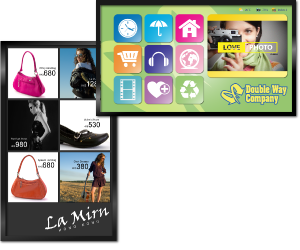
With iSprite Virtual Store Management system, it allows companies to upload various information, such as brand, product name, price, photo into system inventory database through a user friendly interface, then the products will be displayed on the full HD display panel, which giving an eye-catching image to customers.
Besides, customers are even able to check products size, color and stock availability themselves, place order and make the reservation booking for the new items. Furthermore, integrating with the company loyalty program, it allows customer to check their bonus points and redeem the gifts, to attract more customers to use the Virtual Store Management System.
eDirectory Solution
Solution is designed to empower visitors to locate the tenant information for both commercial building and shopping malls. Our user-friendly search engine can save the visitors time to obtain the tenant information they need in just a few clicks, visitors can search by shop categories, by shop name and by floor level. Besides, at the same time, the mall operator can create a modern image to their visitors and act as a marketing tool to broadcast the shopping information and advertisement to visitors. iSprite eDirectory System is more than a building directory.
Way-Finder System
In daily life, showing visitors how to find their way around a large facility or building complex is not an easy task. iSprite Way-Finder System is a creative navigation tool which provide direction and wayfinding options for visitors in large facilities, such as shopping center, school campuses, hospitals, airport, theme park, museum and so on. iSprite Way-Finder System able to show visitors the shortest possible path to reach their destination and the building’s facilities information, like floor plan, rest room location, escalators and so on, guide the users to find the right place easily and quickly. It undoubtedly improves a customer’s experience, productivity of customer-facing staff and enhance customer service. Besides, brands are able to display the information of promotion or some advertisement.
iSprite is an Interactive Touch Digital Signage System. With iSprite business operators can interact with audiences through touch screen-smart device interaction. This kinds of the interactive digital signage are inherently more attention-grabbing, more engaging to customers and viewers than the traditional signage system, turning viewing them into a personal experience.
There are three interactive touch solutions for iSprite could be applied. Virtual Store Management Sysyem; eDirectory System; Way-Finder System.
Virtual Store Management System
Nowadays, one of the challenges that most of the retail operators are facing is the high rental cost and sometimes having not enough space to display the physical products in stores.
With iSprite Virtual Store Management system, it allows companies to upload various information, such as brand, product name, price, photo into system inventory database through a user friendly interface, then the products will be displayed on the full HD display panel, which giving an eye-catching image to customers.
Besides, customers are even able to check products size, color and stock availability themselves, place order and make the reservation booking for the new items. Furthermore, integrating with the company loyalty program, it allows customer to check their bonus points and redeem the gifts, to attract more customers to use the Virtual Store Management System.
eDirectory Solution
Solution is designed to empower visitors to locate the tenant information for both commercial building and shopping malls. Our user-friendly search engine can save the visitors time to obtain the tenant information they need in just a few clicks, visitors can search by shop categories, by shop name and by floor level. Besides, at the same time, the mall operator can create a modern image to their visitors and act as a marketing tool to broadcast the shopping information and advertisement to visitors. iSprite eDirectory System is more than a building directory.
Way-Finder System
In daily life, showing visitors how to find their way around a large facility or building complex is not an easy task. iSprite Way-Finder System is a creative navigation tool which provide direction and wayfinding options for visitors in large facilities, such as shopping center, school campuses, hospitals, airport, theme park, museum and so on. iSprite Way-Finder System able to show visitors the shortest possible path to reach their destination and the building’s facilities information, like floor plan, rest room location, escalators and so on, guide the users to find the right place easily and quickly. It undoubtedly improves a customer’s experience, productivity of customer-facing staff and enhance customer service. Besides, brands are able to display the information of promotion or some advertisement.
Virtual store management System
To discover how our Virtual Store Management System helps retails operator to offload their operation staff workload and increase revenue for the company.

To discover how our Virtual Store Management System helps retails operator to offload their operation staff workload and increase revenue for the company.